Trade Tracker Pro (Fib Indicator)
INSTALLATION INSTRUCTIONS
- Target Tracker Pro is currently only available on the NinjaTrader 8 charting platform. This platform is available as a *free download* that you can run concurrently with any other trading platform.
- Download NinjaTrader 8 now at https://ninjatrader.com/LP/VendorDemo/ .
- Once you have Ninja Trader 8 installed, Click the DOWNLOAD button below.
- Remember where you save this file to!
- Open NinjaTrader 8. Click on Tools at the top of the Control Center panel.
- In the drop down menu under Tools, select Import -> NinjaScript Add-On.
- Select Target Tracker Pro.
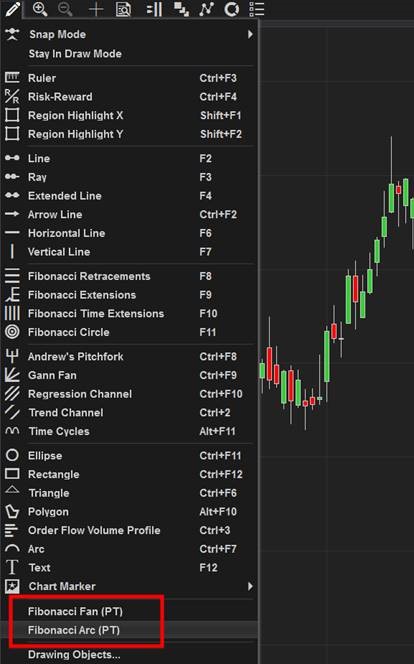
- To use the Target Tracker Pro tools, open a chart on NinjaTrader and click on the pen at the top of the window. This will open the drop-down menu for your tools. Toni’s Target Tracker Pro tools will be at the bottom of the open menu under “Chart Marker” and above “Drawing Object.”
These drawing tools will listed as “Fibonacci Fan (PT) and Fibonacci Arc (PT)” – see image below: